

- Joined
- 15 Jun 2023
- Messages
- 1
- Reaction score
- 0
- Points
- 1
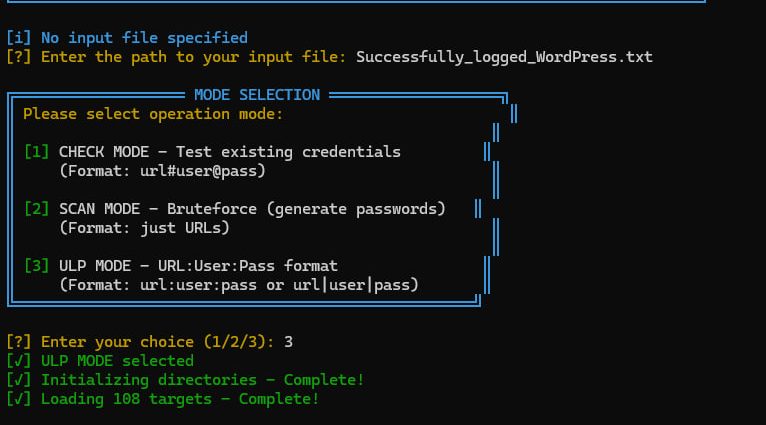
Every now and then, a new WordPress utility ripples through the underground research scene. One of the more recent arrivals is WP-HYBRID v1.0, a hybrid credential checker and brute-force automation tool designed to test login endpoints at scale.
Below is an overview of its core features and the workflow visible in the screenshot.
 What Is WP-HYBRID?
WP-HYBRID presents itself as a multifunction WordPress login tester, capable of validating credentials or performing automated bruteforce routines.The highlight of the tool is its flexible input parsing — letting researchers load large structured lists of URLs, usernames, and passwords.
The UI is terminal-styled with bold ASCII coloration, giving a nostalgic “retro console” feel.
Modes of Operation
The screenshot shows the tool offering three distinct modes, each suited for a different type of credential testing.1. CHECK MODE
This mode is for credential validation — checking if a supplied username/password pair is correct for a specific WordPress login endpoint.“Test existing credentials (Format: url#user@pass)”
2. SCAN MODE
Here the tool attempts password generation or dictionary-based cycles against WordPress login pages.“Bruteforce — generate passwords (Format: just URLs)”
3. ULP MODE
This is the most flexible and typically the mode used for large batch operations.“URL:User:Pass format (url:user:pass or url|user|pass)”
The screenshot shows ULP Mode selected.
What Happens After Mode Selection
Once ULP mode is chosen, WP-HYBRID:- Initializes directories
- Loads the target list
- Displays the total number of targets (in the screenshot: 108)
- Begins threaded scanning (here: 50 threads)
Target Processing Output
After initialization, the tool moves into its main scanning loop.The screenshot shows examples of its behavior:
- [SKIP] — when the provided format is invalid
- [CHECK MODE] — when a URL is processed using a valid credential pair
- The tool prints the URL being checked and often the username found in that entry
Example Input Formats
According to the tool’s own interface, WP-HYBRID accepts:✔ URL + user + pass
https://example.com/wp-login.php:user:password✔ OR pipe-separated format
https://example.com/wp-login.php|user|password✔ For Check Mode
https://example.com/wp-login.php#user@passwordThis flexibility is why many researchers reference it for large batch testing workflows.
Screenshot Breakdown
Here’s what the key elements in the screenshot represent:- “Successfully_logged_WordPress.txt” is the loaded input file
- 108 targets are queued
- ULP MODE is active
- Thread count: 50 indicates fast parallel processing
- Color-coded output shows:
- Skipped entries
- Checked URLs
- Detected username labels
Download : https://software-cracked.com/wp-hyb...ential-checker-bruter-tool-overview-features/